FastSheet
Native Mac spreadsheet · one-time purchase

The spreadsheet you
script in Python.

A fast, native Mac spreadsheet that automates with real Python — not VBA, not macros trapped in the cloud. Works fully offline. Your data never leaves your Mac. Buy once, yours forever.

14 days free.  No account.  No cloud.  Opens & saves .xlsx.  macOS 12+, notarised by Apple.

FastSheet is a Mac app. Open fast-sheet.com on your Mac to download it.

First 100 Founding price $19 $39 — help shape it: [email protected]
400+ Excel-correct functions 1M rows per sheet · 20M+ in a Data Table .xlsx in & out, live formulas Charts · pivots · matrices Apple Silicon & Intel 0 bytes sent, unless you turn on cloud AI
The real app

What you get, unretouched.

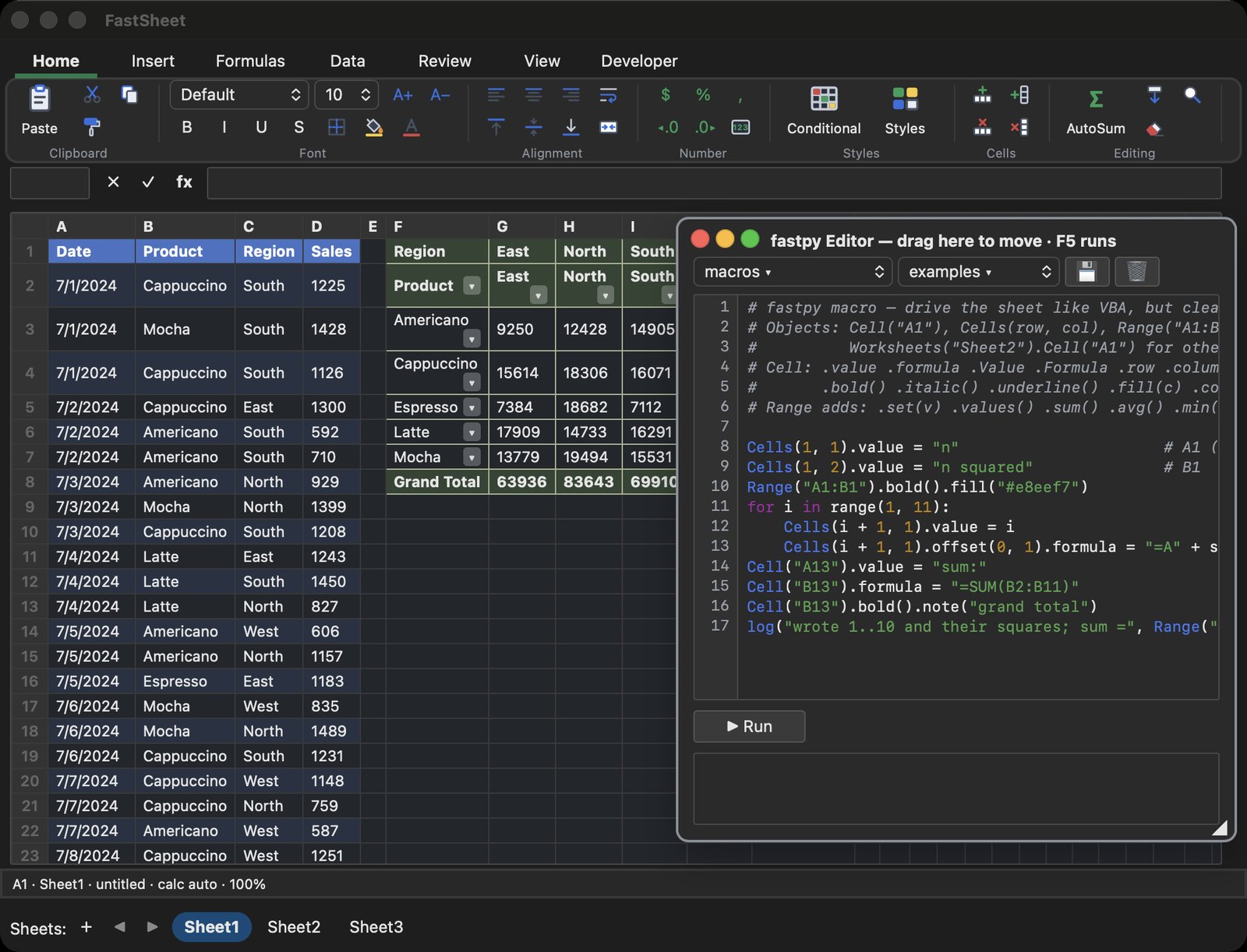
Sales data with a live pivot table, and the Python macro editor beside the sheet.

FastSheet with the Python macro editor open beside a sales sheet and a pivot table
Tools ▸ Macros: Python over your cells
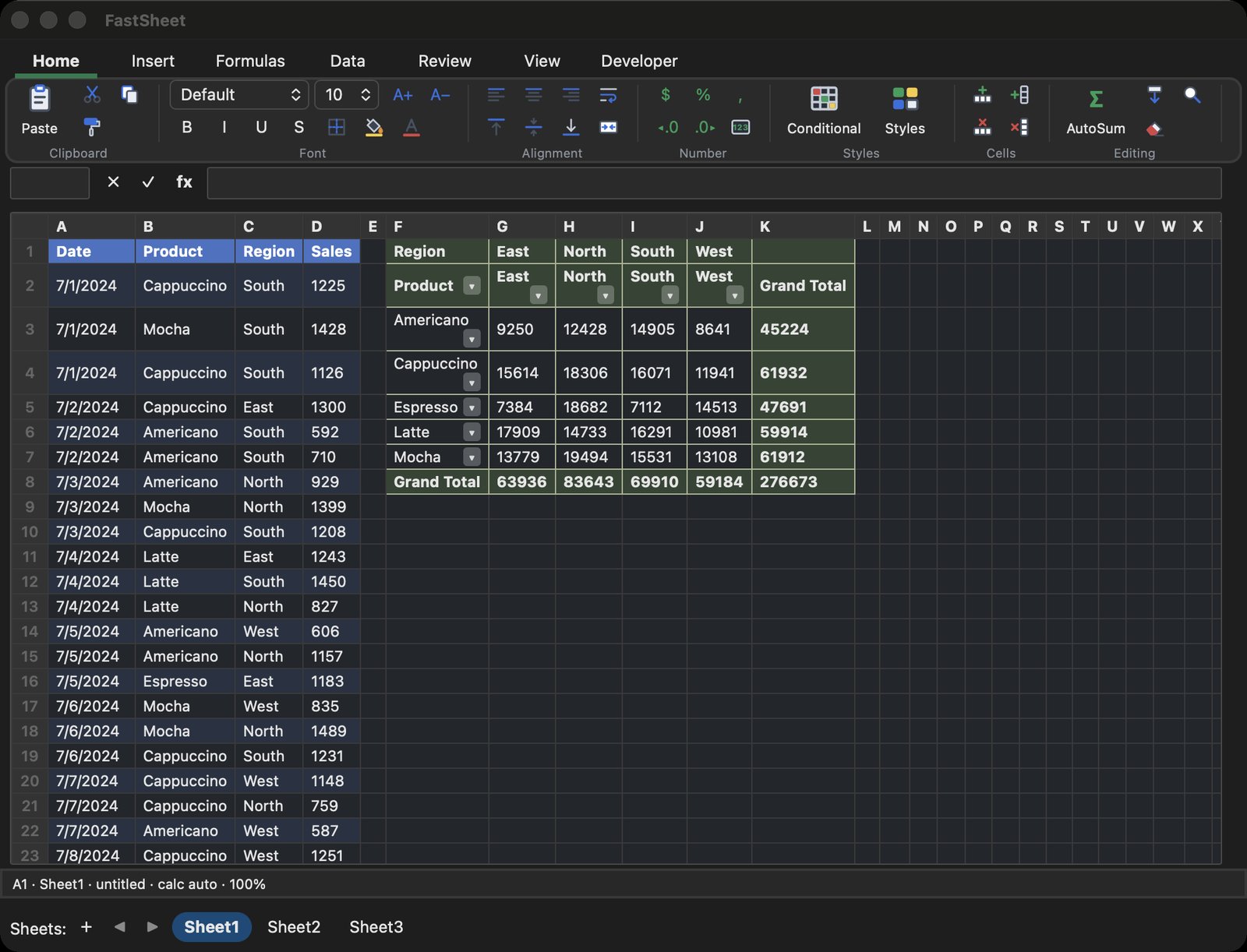
FastSheet showing sales data and a pivot table by product and region
Pivot tables, filters and formulas
The point

Automate the report you rebuild every week.

Every spreadsheet has that one tedious job — reformat, recompute, re-flag, repeat. In FastSheet you write it once, in real Python, and run it over your cells. No VBA to relearn, no add-in to install, no cloud runtime.

The macro editor speaks the whole language — loops, functions, the standard library — over a simple Cell / Range object model. It runs instantly, on your machine, against the sheet in front of you.

Import math, datetime, re, json, the built-in numpy, pandas and scipy modules, or your own .py files — write the transform the way you'd write it anywhere else.

monthly_close.py — Macros
# Build the month-end summary and colour the misses red
import datetime

targets = {"EU": 50000, "US": 40000}
today  = datetime.date.today()

for row in Range("A2:C50"):
    zone, sales = row["C"], row["B"]
    if sales < targets.get(zone, 0):
        row.fill("#ffd7d7")          # missed target
        row["D"] = f"short by {targets[zone] - sales:,}"

Cell("F1") = f"Closed {today:%b %d}"
Everything a spreadsheet should be

Serious formulas. No subscription. No cloud.

Macros

Script anything

Real Python over your cells — loops, functions, the whole standard library. The report you rebuild every week becomes one command.

Formulas

Excel-grade, done right

400+ functions — statistics, matrices, distributions, pivots, charts. Opens and saves .xlsx with live formulas in both directions.

Privacy

Offline & yours

No account, no subscription, no cloud. It runs on your Mac and stays there — the only thing that ever leaves is a file you choose to share.

The Excel parts you still need

A code window, forms, Solver and every chart.

The parts of Excel people still open it for — in FastSheet, offline and scriptable in Python.

Code window

Macros in their own window

Like Excel's Visual Basic editor, beside the sheet: a project list, code tabs with colours and completion, output, F5 to run. Modules share their functions with every macro; your own .py files import too.

UserForms

Small apps inside your workbook

Draw a form — text boxes, lists, buttons — in the form designer, double-click a button for its code, and run it over the sheet. The forms are saved in the workbook.

Solver

Optimize like Excel's Solver

Max, min or a target value by changing cells, with constraints, integer and binary cells. Simplex LP, GRG-style nonlinear, Nelder–Mead and evolutionary methods, and an answer report.

Charts

Every chart you reach for

Bar, stacked and 100% columns, histogram, Pareto, box & whisker, waterfall, funnel, stock, treemap, bubble, 3D — with values under the cursor and zoom.

Data

Slicers for tables and pivots

Click a value to filter a table or a PivotTable; ⌘-click for several. Pivots, sort and AutoFilter, conditional formats, data validation.

Notes

Notes and comments at the cell

Rest the pointer on a marked cell: read, edit, reply or delete in a small card at its corner. Replies make a comment thread you can resolve.

AI, your way

Ask in plain words. Keep your data.

Have Ollama on your Mac? FastSheet finds it by itself — no settings, and nothing leaves your Mac. With the free qwen2.5-coder:7b model it did 56 of 62 real sheet tasks right in our tests. Or use Claude with your own Anthropic key. No Ollama, no key: no AI, nothing sent.

Chat

Talk to your sheet

Tools ▸ AI ▸ AI Assistant, beside the sheet: ask what is in the data, or ask for a change — "add a Revenue column", "sort by date", "copy the West rows to Sheet2". The AI's macro runs only when you click ▶ Run: FastSheet checks it first, sends any error back to the AI for a fix, and Undo takes a run back. No AI set up? Copy the macro guide into ChatGPT or Claude.

Formulas

=AI() in a cell

Classify, extract or summarise right in the grid. Answers are cached and saved with the workbook, so a recalculation — or opening the file again — asks nothing twice.

=AI("Positive or negative?", B2)
Agents

Claude can use FastSheet

fastsheet-mcp is an MCP server: Claude Desktop, Claude Code and other agents open, read and write workbooks, run macros and save .xlsx — with FastSheet's own engine.

claude mcp add fastsheet -- ~/bin/fastsheet-mcp
Fast, and then some

Quick enough to be your database.

An incremental engine recomputes only what changed, so big sheets stay fluid — and when your data outgrows cells, FastSheet queries real database files in place.

Speed

Built for scale, native

A small native app — no Electron, no Java. Each sheet has a million rows; the grid draws only what you see and loads the rest as you scroll, and the incremental engine recomputes only the cells that depend on your edit — so a change lands in about five milliseconds. When everything must recompute, 100,000 formulas take about two seconds (about seven the first time, while each formula is translated).

~5 msto recompute an edit
1Mrows per sheet
~2 sto recompute 100k formulas
Big data

Point it at real data

Link a CSV or database file and query it live with DBSUM, DBLOOKUP, DBAVG, DBCOUNT — backed by a real SQLite engine, no import step. Edit the source, hit refresh, your sheet updates. A spreadsheet that talks to a database.

A big CSV opens as a Data Table: sort, filter and group 20 million rows on a 16 GB Mac. Excel stops at 1,048,576 rows, Numbers at 1,000,000.

20M+rows in a Data Table
0.3 sto open 1M rows
0.02 sto sort 1M rows
Same 1,000,000-row CSVFastSheetNumbers
Open the file0.3 s19 s
Sort by a column0.02 s15 s
Filter (region = North)0.02 s5 s, then ~1 min “Calculating…”
Memory in use~0.5 GB~2.7 GB
Most rows per table20 million+1,000,000

Measured 17 Oct 2026 on one MacBook (Apple M5, 16 GB, macOS 26.6) with Numbers 14.5: a 65 MB CSV with 10 columns. FastSheet times are its Data Table engine through File ▸ Import CSV; Numbers was timed through its own window.

Honestly

Where FastSheet fits.

It won't replace Excel for everyone, and it doesn't try to. It's for people who want a fast native spreadsheet they can script — and own.

FastSheetExcel 365NumbersGoogle Sheets
Price$19 once · first 100~$100 / yearFreeFree
ScriptingPythonVBA—Apps Script (JS)
Works offlineYesPartialYesNo
Data stays localAlwaysCloud-linkedYesCloud
Reads / writes .xlsxYesYesImport/exportImport/export
Most rows1M per sheet · 20M+ in a Data Table1,048,5761,000,00010M cells
Pricing · founding offer

The first 100 get it for $19.

Fourteen days free, fully unlocked, no card. Then one payment keeps it forever, with a year of updates — no renewals, no seats, no cloud login. The first 100 buyers pay $19 instead of $39; in return, you get my ear — email bugs and ideas straight to [email protected] and help shape v1.

$39$19
one-time · first 100 buyers
Download free trial
FAQ

The questions people actually ask.

Does it open my Excel files?

Yes — .xlsx in and out, with live formulas both directions. Edit a cell and dependent formulas recompute, in FastSheet or back in Excel.

Is my data uploaded anywhere?

Never by default. FastSheet works fully offline and your files stay on your Mac. It goes online only for the one-time licence unlock and, if you choose Claude, for AI. A local model (Ollama, found by itself when it runs on your Mac) keeps everything on your Mac; Claude sends what you ask to Anthropic, with your own key.

Is it a subscription?

No. Buy once. A year of updates is included, and the version you bought keeps working forever, offline.

What language are the macros?

Python — the real thing, with the standard library. Not VBA, not a cloud runtime. Runs instantly on your machine.

Which Macs does it run on?

Apple Silicon and Intel, as a native app. No Rosetta, no Java, no Electron bloat — one small download.

What if it's not for me?

The 14-day trial is fully unlocked — you'll know before you pay a cent. And there's a refund window on every purchase.

How much data can it hold?

Each sheet has 1,000,000 rows and 52 columns (A–AZ). A bigger CSV opens as a Data Table: 20 million rows sort, filter and group in well under a second on a 16 GB Mac, and formulas read it with DBSUM and friends.

How does it compare with Numbers?

Numbers is free and lovely for small tables. On the same 1,000,000-row CSV, FastSheet opened it in 0.3 s and sorted it in 0.02 s; Numbers took 19 s and 15 s. And FastSheet runs Python macros and keeps Excel files as Excel files.

Download FastSheet — free 14-day trial Buy now — $19 (first 100)

macOS 12+ · Apple Silicon & Intel · ~25 MB · notarised by Apple